Fraction Models
Free printable fraction model worksheets. Naming and comparing shaded bars on one sheet, three of each, with a key.
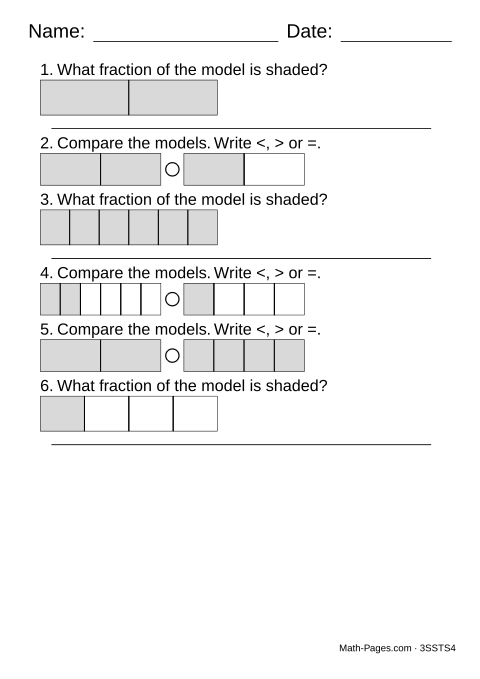
Six problems a sheet, mixing the two drawn question types: writing down the fraction a shaded bar shows, and comparing two bars with <, > or =. Three of each, because the sheet draws a fair sequence rather than choosing afresh each time.
Six is the whole page because a bar has to be wide enough to read - cut into sixths, its parts are only just distinguishable at this size, and a smaller bar stops being a picture worth reading. If you want one of the two types on its own, Identifying Fractions has the naming questions and Comparing Fractions With Models has the comparisons.
What this worksheet covers
- Name the fraction a shaded bar shows
- Compare two fraction bars with <, > or =
Common Core standards
- 3.NF.A.1 Understand a fraction as parts of a whole divided into equal parts.
- 4.NF.A.2 Compare two fractions with different numerators and different denominators, including with a visual model.
Try it with fraction bars
Split bars into halves, thirds, all the way to twelfths, and shade some of the pieces. Line the bars up under the whole to see which fractions are equal and which is larger.
Frequently asked questions
What is a fraction model?
A bar divided into equal parts with some of them shaded. The student reads the fraction off the picture instead of calculating it, which is how fractions are usually introduced.
Which two question types are mixed here?
Naming the fraction that one shaded bar shows, and comparing two bars with <, > or =.
Why only six problems on a page?
Each bar needs enough width for its parts to be told apart. At six per page a bar cut into sixths is still clearly readable; more problems would shrink it past the point of being useful.
Can I print just one of the two types?
Yes. Identifying Fractions prints only the naming questions, and Comparing Fractions With Models only the comparisons.